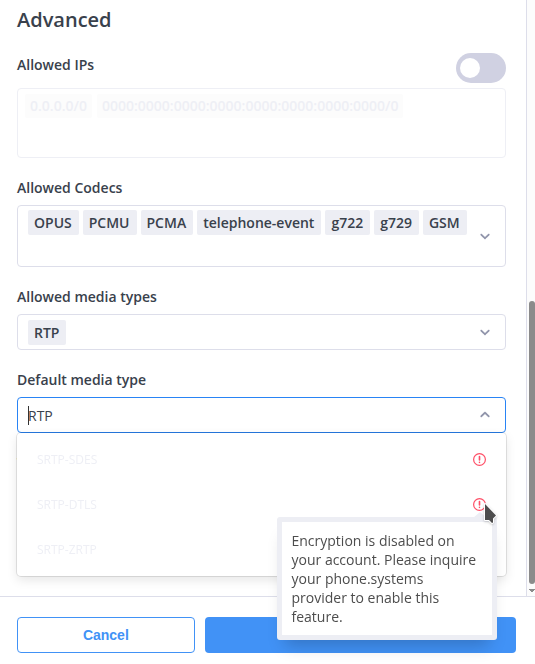
My number is set to Forwarding details - Phone System but

My number which I just set to Forwarding details - Phone System, but all calls incoming and outgoing failed like it should have been previously. Why? Call flow have been barely touched. I only change it to PBX Phone System recently as I noticed that the call flow does not reflect whatever that has been made on Phone.Systems. Incoming calls suppose to call to LinPhone SIP and not the SIP account provided by Phone.Systems. :expressionless_face:

I would love if all my Flynumbers are pointed to the Cloud Phone System so I can self manage the routing. DTLS and TLS enabled.

Without DTLS and TLS support, my non-technical family members and I must constantly adjust LinPhone’s general encryption setting to “none” in order to make outbound calls through the phone.systems proxy SIP. This setting applies globally to all proxy SIP accounts stored in the app. I find it inconvenient that we are forced to download a separate app provided by phone.systems just to make calls, especially since incoming calls are already forwarded to LinPhone perfectly as intended (but currently not working after changing Forwarding details to Phone System on main FlyNumber website).

Sorry for the late reply here @Zar and working to get the TLS enabled on the phone system for you.

Usually its much quicker but need our engineer to make some adjustments on your account, should have an update shortly.

Please leave the settings in My account > My FlyNumbers as-is (we just confirmed all your numbers are pointed to the phone system now)

Thank you for the reply! Here are the results from my test. Apologies if there are a high usage traffic from one of the SG number as I had to do constant testing that the call flow works from either my local mobile or from someone else.

————

Unsuccessful Operations

  • SIP Account and Forwarding Configuration: The SIP Accounts provided by phone.systems, specifically SIP Forwarding, Default Media Type “DTLS,” and Transport Protocol “TLS,” remain disabled.

  • SIP Forwarding to LinPhone Users: Calls forwarded to LinPhone users are not functioning as expected.

  • PSTN Forwarding: Public Switched Telephone Network (PSTN) forwarding is currently inoperative.

  • UK Landline Calls: Calls originating from UK landlines do not connect correctly and fail to adhere to the established Ring Queue call flow.

  • Internal SIP Calls to Flynumbers: While calls from phone.systems SIP accounts to Flynumbers ring on the originating SIP account, they do not follow the Ring Queue call flow, which should simultaneously involve PSTN forwarding, SIP accounts, and SIP forwarding.

  • Unexpected Call Routing for Specific Numbers: Several numbers (SG number ending in 5440, UK numbers ending in 3701, 3704, 3720, and 63561) ring, but they appear to connect to unintended local recipients rather than Flynumber, and they also disregard the configured Ring Queue call flow.

Successful Operations

  • Landline to Singapore Number: Calls placed from a landline to the Singapore number ending with 5115 are functioning correctly but only to provided SIP account by phone.systems, not SIP forwarding and PSTN rule in Ring Queue.

Just did an SMS test from realworld mobile number to one of the UK mobile number, that failed as well. Did not receive anything in my email.

  • Realworld Landline/Mobile to Singapore Number: Calls placed from a landline to the Singapore number ending with 5115 works now maybe its just my realworld phone that hates the call. Tested with incoming (made them call 5115 number) to PSTN through other family member’s number from same country and one in Mexico.

All other numbers previously stated not working are still not working and not pointing to flypbx Call Flow. Are you doing it manually? I believe after getting the number, one have to create a new phone number (DID Number) in phone systems. I’m guessing everythings not automated. Just to let you know I have already inserted all the numbers assigned in call flow. Just left 1 number you yet to assign to me.

Hi @Zar,

Can you provide some call logs for when the calls fail?

There are hundreds of calls coming in over a very short period of time, so I’m not sure if it could be a capacity issue.

Could you try one call at a time per forwarding destination? For example, a call to a SIP account, a call to a phone number, and then we can look into the issues from there.

We are not seeing any specific issues that would cause any problems.

Regarding the TLS, we need to clarify the usage of this (new) account in order to make sure all is well - we need to protect our relationship, especially concerning our partnerships with carriers, so please excuse the back and forth while we figure this out.

Hundreds? That’s wayyy too much. I dont call hundreds. My fingers or family member’s would get tired. Maybe 10-30 calls like hours or per day? Trying to test again and again but failed. I believe the logs are on phone.systems backend.

Sure thing, but that’s what I did. You can try test it if you want calling those numbers except 5115 from a real landline/mobile. 5115 works beautifully. Erm.. I could do another round of test, say.. 1 number 1 call per hour maybe?

Ok, understood. TLS part can wait. Is just not routing to call flow else I be hearing the audio ringtone I have already setup for all of them except for 1 which is waiting for a number to be assigned.

All numbers are the last 4 digits. All numbers stated below are being called and from both softphone client and local mobile number. Shall conduct call tests per hour. If any spams in call log from the same send/receive, do not ask me why, I have no idea. Could be the telecom side. I would only call once or 4 times from local number at most from the same local number and/or softphone.

———

5115 (SG number) test done, a call from 5435 (real world mobile). Works as intended with ringtone set in Call Flow. - 6:13 pm GMT +08

Time called in Call Flow CDRs
2025-09-17 18:05:52

Log on Flynumber - Login to FlyNumber Account
2025-09-17 10:05:11

Some unknown US number 8467 called 5115 at

Time called in Call Flow CDRs
2025-09-17 19:36:17

Log on Flynumber - Login to FlyNumber Account
2025-09-17 11:36:16

———

5440 (SG number) test done, a call from 4304 (real world mobile). Rang and Failed - 7:33 pm GMT +08

Time called in Call Flow CDRs
Did not show up

Log on Flynumber - Login to FlyNumber Account
2025-09-17 11:33:22

———

3561 (UK London number) test done, a call from 4304 (real world mobile). No rings and Failed - 8:06 pm GMT +08

Time called in Call Flow CDRs
Did not show up

Log on Flynumber - Login to FlyNumber Account ( There are like 27 log records and I do not know why. Honestly I only called once! )
2025-09-17 12:06:10

———

3701 (UK Mobile number) test done, a call from 4304 (real world mobile). Number not valid and Failed - 9:48 pm GMT +08

Time called in Call Flow CDRs
Did not show up

Log on Flynumber - Login to FlyNumber Account ( Called 4 times. All of them gave number not valid )
2025-09-17 13:48:16

———

3704 (UK Mobile number) test done, a call from 4304 (real world mobile). Some Advertisement Played “The world of knowledge and entertainment” and Failed “Did not appear in Call Flow logs” - 12:44 pm GMT +08

Time called in Call Flow CDRs
Did not show up

Log on Flynumber - Login to FlyNumber Account ( Called 4 times from local number an ad played and twice from softphone which immediate gets terminated )
2025-09-18 4:37:25

———

3720 (UK Mobile number) test done, a call from 4304 (real world mobile). Rang but not sure calling who since softphone and local number did NOT ring, and Failed “Did not appear in Call Flow logs” - 3:47 pm GMT +08

Time called in Call Flow CDRs
Did not show up

Log on Flynumber - Login to FlyNumber Account ( Called 1 time from local number and TWICE from softphone which immediate gets terminated )
2025-09-18 7:47:53

———

Hi @FlyNumber ,

All done. Please check. This is coming to two weeks of failure. Saw a couple of reviews on trustpilot where others sat in the same shoe. All numbers assigned accept for 5115 did not connect to phone.systems. Its your internal issue and has nothing to do with incoming. Called from SG local numbers (mine and someone elses) and softphone from a different SIP provider as well. At rare occations, even had calls from Malaysia and Mexico where they all able to call to 5115 but not all the others.

HI Again @Zar,

Looking through your call flow and logs, I can spot a couple of issues.

At some points in the flow, you’re forwarding to a regular phone number with blocked/anonymous calls coming in—this could be an issue (carrier level).

Please see this tidbit of info with more details here [blog post].

As far as some of the “Request terminated” entries you’re seeing in the logs—this seems to be coming from the forwarding. Please make sure the phone/device is online. We see you’re using SIP; make sure STUN is off in the SIP client and perhaps try toggling TCP/UDP transport settings in the SIP client. It could help if you sent some of the logs from the SIP client (just the relevant part, for example, when the test call comes in).

As for the UK numbers on the account, could you try setting one of them directly to a ring group/contact method so we can clearly test to rule out things like the call router and queue that you had set up?

Just to mention, there is a 2-channel incoming limit on each number (we’ll have the ability for you to purchase more in the future), but we notice on your UK FlyNumber ending in 3561 there are multiple calls coming within a second or two of each other. Not sure if you’re hitting the limit here but also don’t see the UK numbers that are dialing the FlyNumber. So this may be worth looking into.

Let’s set this UK FlyNumber directly to a SIP account you have and test accordingly, please.

Appreciate your patience and feedback with all this as well.

Hi again @FlyNumber

Already tried with UDP and TCP with STUN on and off before raising the issue.

Call flow adjusted to directly point all numbers below to Calling Queue. Also removed all SIP Forwarding on all Call Queues, so it’s just PSTN and SIP Account.

5440, 3561, 3701, 3704, 3720

All of those numbers (except 5115 that passed with incoming/outgoing with ring media no matter what medium was used to call) failed with incoming. Outgoing works without a “+” prefix on a softphone calling out to real world local number.

  • Flynumber to flynumber to all those numbers on softphone with and without “+” prefix failed. Address call used is sip:[email protected]

  • Local number calling to those fly numbers with and without “+” prefix failed. Local number called someone in real world holding those numbers instead. I have IDD on my local mobile number to be able to call internationally.


I shall not touch 5115 as it is working perfectly.

Really appreciate your patience here @Zar, and we’ve found the issue. Because of the earlier request to enable TLS, the other (newer) FlyNumbers weren’t configured here properly. I just confirmed, and all your FlyNumbers should now work just like your original 5115.

Please retest and let me know if you run into anything at all.

1 Like

Works now as it should now while the annoyance of everyone having to change DTLS calling encryption to None stayed, as calling with that option unchanged will terminate the call. Thank you @FlyNumber hoping to fix that part. Still waiting forever for the last number, Tijuana Mobile still. Tested SMS to the assigned numbers doesn’t work as well.

  • Test calling UK and SG number in/out works now without DTLS.
  • Waiting for Tijuana Mobile still.
  • SMS (receive in email) does not work. Sent to UK mobile.

Hi @Zar,

Your Mexico number was sent and is active on the phone system.

Now that we have this working and received clarification on the high-volume calls, we will tackle enabling TLS on this account - we just want to be clear on what the account is being used for.

With SMS, please make sure to test from a UK mobile number if you can - more details on SMS here:

Thank you @FlyNumber . Working on the call routes for Mexico number and test on that as we speak.

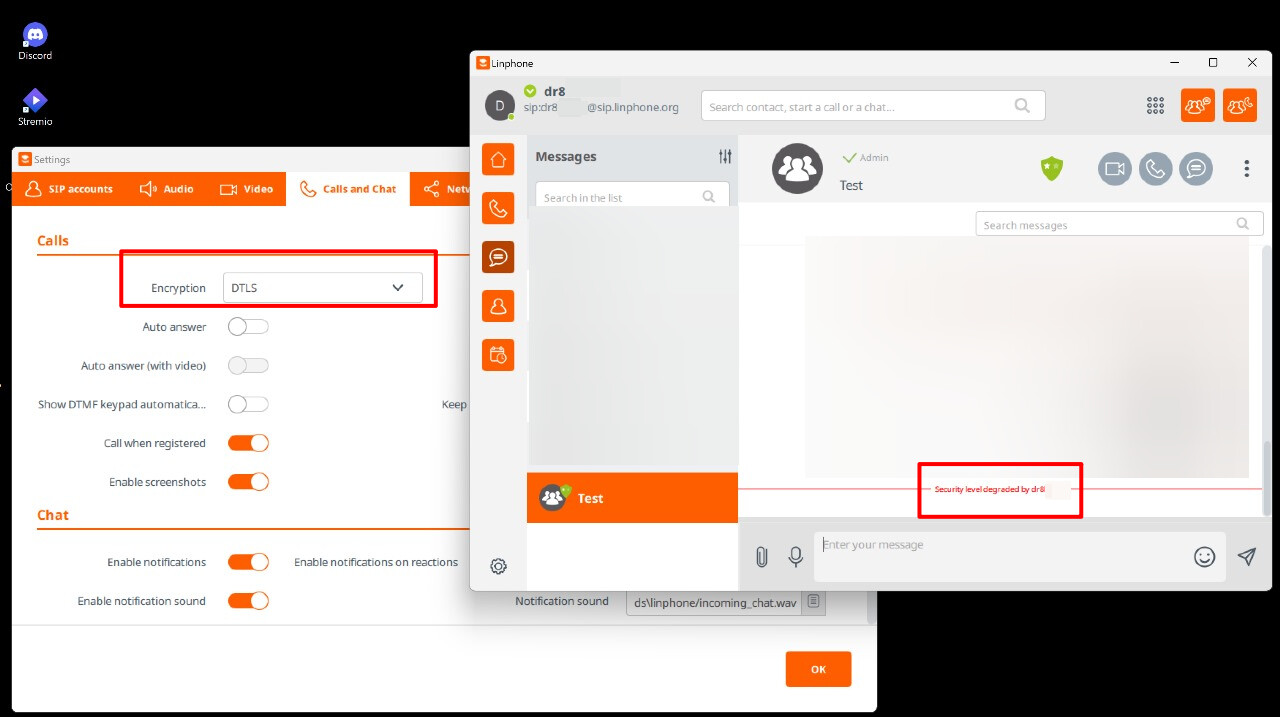
As you now know (screenshot attached below) DTLS is a general setting for call and media encryption on LinPhone settings instead of the separate SIP proxy setting for Flynumber SIP account.

It affects my family and my own chat on the main SIP (not proxy) as we have to always turn that thing off everytime we need to make an outgoing call.

Personally, I have like 6 SIP accounts tied to LinPhone app, 1 is LinPhone, 2 of which is Flynumber and the others are my own self hosted servers for work. Some of my family has more than mine, so it would be a nuisance having to always keep changing things around and the non tech savvy ones have to call me up just to seek help. Sorry but this is like the 4th or 5th time that I have to explain it to you.

Thought it would be simple to get it enabled.

As for TLS, I am not sure if DTLS needs TLS to be working hence TLS is an option.

Hi again @Zar,

Getting more info on enabling TLS here, we will update the account ASAP.

As an alternative, you might want to consider the phone system app - it uses WebSocket

Here it uses WebSocket and TLS by default - more details here

Hi @FlyNumber

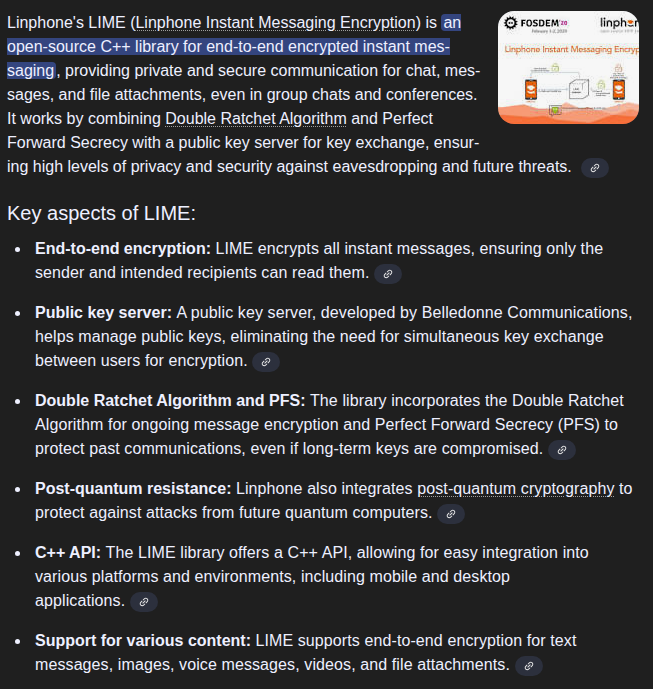
Thank you for the reply. I was thinking the same but apparently LinPhone is using its own custom end2end encryption using lime aside from TLS and DTLS. It would just add another issue of having everyone to port over where our old conversation history will be lost. Currently I’m at a lost on tackling of what could be done if we would switch over. The easy route would be just having DTLS for that Call/Media option yet still have everything intact and working.

Hi @Zar,

Understood, and it seems you’re heavily invested in LinPhone and its infrastructure, as far as messaging and calls are concerned.

We’re planning to enable TLS on our side on Monday to see if you could find a workaround for this.

Hi Again @Zar

The TLS option was enabled here, please try that with LinPhone and let me know if that takes care of the issues.

Thank you so much @FlyNumber ! Tried and tested. DTLS and Post Quatum ZRTP can’t be used still. I have told everyone of my family to switch to SRTP with “encryption is mandatory” enabled instead so every other SIP main and proxy could be use without any errors. Nonetheless, its still something and saves the headache.. Calls and messages are getting through now..

1 Like