Šiuo metu konfigūruoju telefono sistemą, tačiau susiduriu su keliomis problemomis:
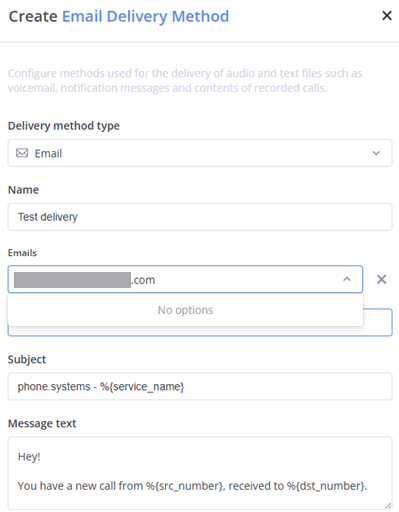
Pristatymo metodo nustatymas:
Bandau nustatyti sistemą taip, kad balso paštas arba garso failai būtų siunčiami į mano el. paštą. Tačiau, kai bandau pridėti pristatymo metodą, sistema neleidžia įvesti mano el. pašto adreso. Atrodo, kad laukas nepriima rankinio įvedimo ir nėra jokių galimų pasirinkimų iš sąrašo. Nežinau, kaip tęsti šio nustatymo konfigūravimą.
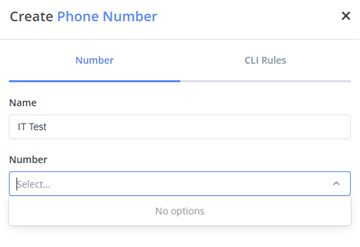
Skambučių srauto konfigūracija:
Taip pat negaliu priskirti telefono numerio skambučių srautui. Išskleidžiamajame meniu nėra jokių galimų pasirinkimų, o rankinis įvedimas neleidžiamas, nors telefono numerį jau esu apibrėžęs meniu „Phone Number“.
Kai FlyNumber priskiriate kaip „DID Number“ kontaktiniame metode, tas numeris tampa tiesiogiai susietas su tuo kontaktiniu metodu. Tai reiškia:
FlyNumber nebus pasiekiamas Phone Number modulyje naudojimui call flow schemose
Toks tiesioginis priskyrimas yra paprastas, bet riboja galimybę kurti sudėtingas call flow schemas
Jei norite naudoti FlyNumber call flow schemose su moduliais skydelyje, jo neturėtumėte priskirti kontaktiniame metode
Pasirinkite konfigūraciją pagal savo poreikius:
Paprastas nukreipimas: priskirkite FlyNumber tiesiogiai kontaktiniame metode
Sudėtingos call flow schemos: palikite FlyNumber nepriskirtą kontaktiniuose metoduose, kad galėtumėte jį naudoti Phone Number modulyje
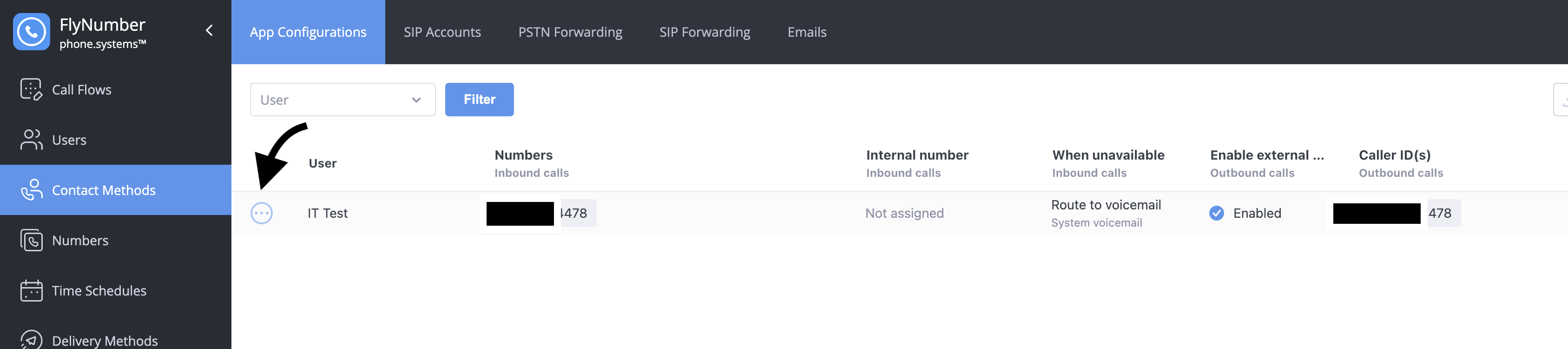
Jūsų atveju matau, kad FlyNumber yra priskirtas „App Configuration“ – tai reiškia, kad jums tereikia paredaguoti tą kontaktinį metodą ir išvalyti „incoming“ DID number.